Download Weather Station free on android
APK file Weather Station 1.0.10.4How to install APK / APKS / OBB file on Android
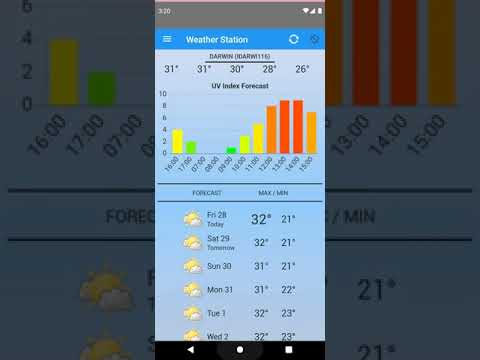

Fully Functional Weather Station
* Supports both large screen HD and phone displays
* records data displays history graphs
* Pressure
* Current conditions widget
* Forecast weather widget
* Rainfall
* Humidity
* Solar Radiation (if supported by station)
* Wind Speed and direction
* Dark mode
* Metric and American Standard Units
* Inside temperature sensor support (Arduino, Netatmo & battery sensor, Bluetooth zigbee2mqtt and clientraw)
* Android Sensor (pressure, temperature, humidity and light)
* Automatic location update by Wifi or GPS
* Sunrise and Sunset
* Widgets x4, Lockscreen
* Talking Clock and Weather announcement
* Service providers supported: Ambient Weather, Davis, NOAA, Weather Online, Open Weather Map, Yahoo Weather, BOM Australia, Norway Weather, Netatmo, Arduino (HTTP JSON), Mesowest and ClientRaw, PWS, Ecowitt.
* Arduino based inside temperature, pressure humidity sensor
If you're having difficultly with the App working please try
Android Settings > Application Manager > Weather Station > Clear data
This clears all the configuration and hopefully will restore the App to a working state. You might also need to remove the widget from the home screen and add it again.
If you'd like to try the Beta, press the "Become a tester" button at https://play.google.com/apps/testing/com.arf.weatherstation.
After this an update will be available via Google Play.
Questions, comments, or bug reports? Feedback is welcome, just send to dromosys@gmail.com or use the in App request support form.
Permissions:
gps - automatic location configuration
wifi - communication to weather service
storage - import / export user preferences
- LicenseFree
- File nameWeather Station
- File Version1.0.10.4
- Package namecom.arf.weatherstation
- UploadedSeptember 28, 2026

- CategoryWeather
- DeveloperDromosys
- Developer sitehttps://www.facebook.com/DracoSystems/posts/824302454384365
- Developer emailandroid.robot.factory@gmail.com
- Permissionsshow (19)

